




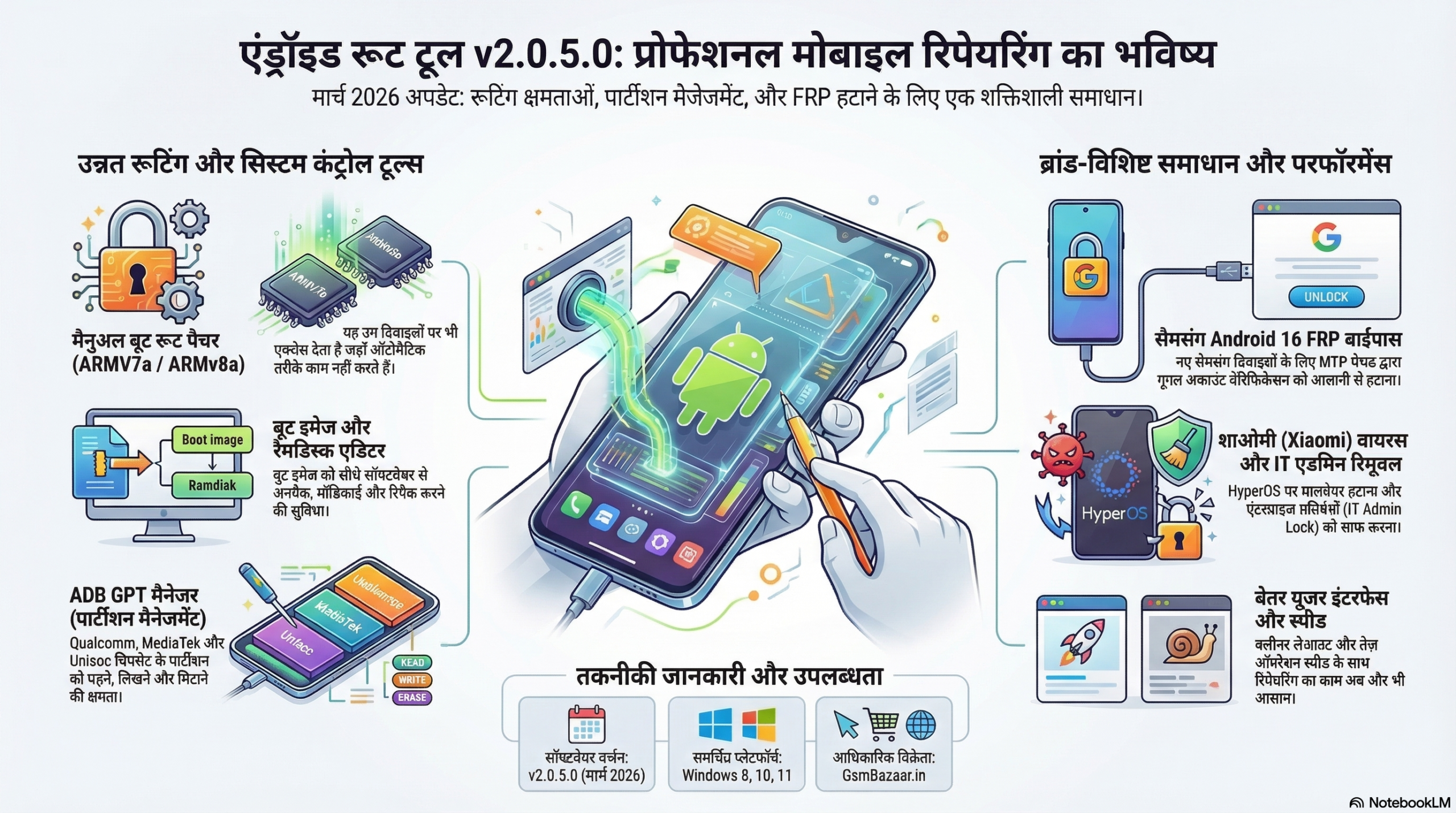
The Android Root Tool v2.0.5.0 update released in March 2026 introduces several powerful features designed for mobile repair technicians, Android developers, and advanced users. This update focuses on improving rooting capabilities, boot image editing, partition management, and FRP removal, making it a valuable tool for professional Android servicing.

In this detailed guide, we will explore the new features, improvements, and real-world uses of Android Root Tool v2.0.5.0. If you work with Android software repair or device customization, this update brings several enhancements that can significantly improve your workflow.
What is Android Root Tool?
Android Root Tool is a professional software utility designed to help users manage and modify Android devices at a deeper level. It allows technicians to perform tasks such as:
- Rooting Android devices
- Editing boot images
- Managing device partitions
- Removing FRP locks
- Controlling system apps
- Performing advanced Android servicing operations
The tool is widely used by mobile repair shops, Android developers, and technical service centers because it provides advanced control over Android devices that is not possible with standard tools.
The latest version Android Root Tool v2.0.5.0 expands these capabilities with new functions aimed at improving compatibility with modern Android devices.
Android Root Tool v2.0.5.0 – New Features
The March 2026 update introduces several new features and improvements that enhance the software’s capabilities.
1. Manual BOOT Root Patcher (ARMV7a / ARMv8a)
One of the most important additions in this update is the Manual BOOT Root Patcher.
This feature allows technicians to manually patch the boot.img file, enabling root access even on devices where automatic rooting methods fail.
Supported CPU architectures include:
- ARMV7a
- ARMv8a
This method provides advanced control over the rooting process and is particularly useful for devices that require custom boot patching.
Benefits
- Supports manual rooting methods
- Greater device compatibility
- More control over the root process
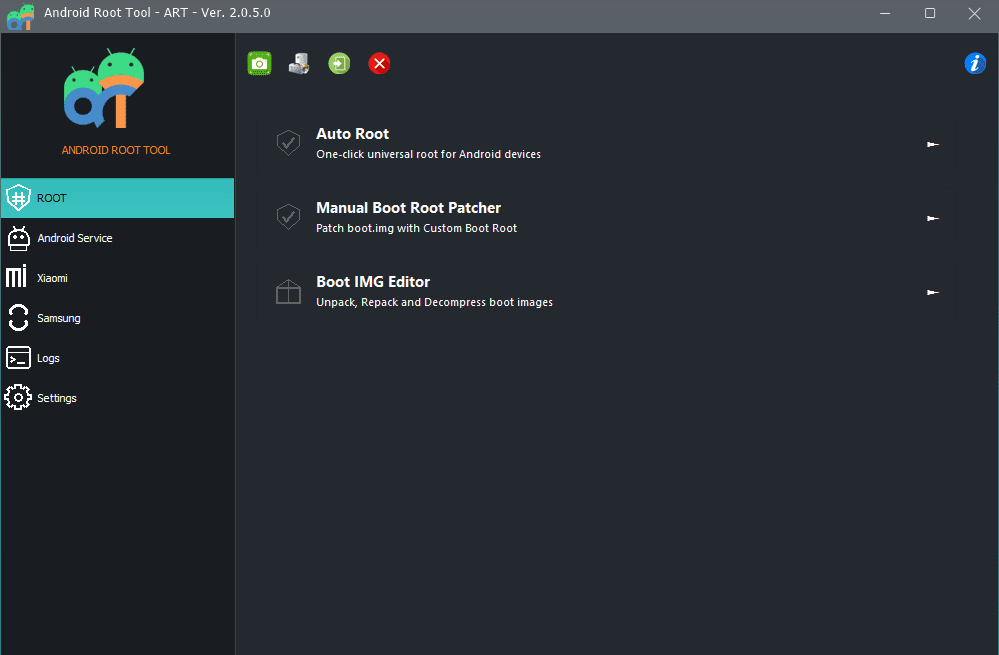
2. Android BOOT IMG Editor (Unpack / Repack)
The new BOOT IMG Editor allows users to unpack and repack Android boot images directly from the software.
With this tool, technicians can:
- Extract boot.img components
- Modify boot configurations
- Rebuild the boot image after editing
This feature is particularly useful for developers and technicians who perform custom modifications, root patches, or kernel adjustments.
Use Cases
- Creating custom root patches
- Editing boot configuration files
- Advanced Android development work
3. Android Ramdisk Unpack Feature
Android Root Tool v2.0.5.0 now includes a Ramdisk unpacking function.
The Android ramdisk is a critical part of the boot process. With this feature, users can extract and modify ramdisk files for deeper system customization.
Technicians can use this function to:
- Modify boot scripts
- Apply advanced root patches
- Adjust system-level configurations
This feature is mainly useful for advanced Android developers and professional repair technicians.
4. Xiaomi Virus Removal Tool
Another major addition in this update is the Xiaomi Virus Removal feature.
Some Xiaomi devices occasionally encounter malware infections or system-level modifications that cannot be removed through standard factory resets.
With this feature, technicians can:
- Remove hidden malware
- Clean unwanted system modifications
- Restore device performance
This tool is especially helpful for repair shops that regularly service Xiaomi devices.
5. Xiaomi IT Admin Remove (HyperOS Support)
The update also introduces a feature to remove IT Admin restrictions on Xiaomi devices running HyperOS.
In some cases, devices used in enterprise environments are locked with administrative restrictions. This feature allows technicians to remove those restrictions and regain normal device access.
Key Uses
- Remove IT Admin lock
- Restore device control
- Solve enterprise device access issues
6. ADB GPT Manager (Partition Management)
Android Root Tool v2.0.5.0 now includes an ADB GPT Manager, which allows technicians to manage device partitions.
Supported chipsets include:
- Qualcomm
- MediaTek
- Unisoc
Using this feature, technicians can perform operations such as:
- Listing device partitions
- Reading partition data
- Writing partitions
- Erasing partitions
This function is highly useful for firmware repair, advanced device servicing, and partition-level troubleshooting.
7. Android Apps Manager
The update also adds an Android Apps Manager, which allows users to control installed applications directly through the software.
With this tool, technicians can:
- List installed apps
- Disable unwanted system apps
- Enable disabled apps
This feature helps remove bloatware and unnecessary applications, improving device performance.
How to Buy Android Root Tool
How to Buy Android Root Tool
Available on GsmBazaar.in8. Samsung Android 16 MTP FRP Remove
FRP (Factory Reset Protection) removal has been improved with support for Samsung devices running Android 16.
The new Samsung Android 16 MTP FRP Remove method allows technicians to bypass Google account verification using the MTP method.
Advantages
- Supports newer Samsung devices
- Simplifies FRP removal
- Saves time during device servicing
9. Fastboot Flash Patched Boot IMG
The new version allows users to flash patched boot images directly through Fastboot.
This simplifies the rooting process significantly.
Typical workflow includes:
- Patch the boot image
- Boot the device into Fastboot mode
- Flash the patched boot image
This process is commonly used for modern Android rooting methods.
10. Improved Auto Root Function
The Auto Root function has also been improved in this update.
Enhancements include better support for:
- Xiaomi devices
- Samsung devices
The improved algorithm increases the success rate of automatic rooting, reducing the need for manual methods.
11. Improved Software User Interface
The software user interface has been redesigned to make it easier to use.
Changes include:
- Cleaner layout
- Better feature organization
- Faster navigation
These improvements make the tool more user-friendly, even for technicians who are new to Android servicing tools.
12. Improved Software Performance
Android Root Tool v2.0.5.0 also includes performance improvements that enhance the overall experience.
Improvements
- Faster operation speed
- Improved software stability
- Better compatibility with modern Android devices
Who Should Use Android Root Tool?
Android Root Tool is ideal for:
- Mobile repair technicians
- Android developers
- Software servicing professionals
- Advanced Android users
If you frequently work with Android rooting, FRP removal, boot image modification, or firmware repair, this tool can significantly simplify complex tasks.
Android Root Tool v2.0.5.0 Free Download
Android Root Tool
Version 2.0.5.0| Application | Android Root Tool |
| Version | 2.0.5.0 |
| Release Date | March 8, 2026 |
| License | Paid |
| Platform | Windows 8 / 8.1 / 10 / 11 |
Final Thoughts
The Android Root Tool v2.0.5.0 update introduces several powerful features that improve Android servicing and customization capabilities.
With tools like Manual Boot Root Patcher, Boot IMG Editor, Xiaomi Virus Removal, GPT Partition Manager, and Samsung Android 16 FRP Removal, this update strengthens the software’s position as a reliable solution for professional Android technicians.
For anyone working in mobile software repair or Android development, this update provides valuable tools that improve efficiency and compatibility with modern devices.
What is Android Root Tool?
Android Root Tool is a professional software used by mobile repair technicians and advanced Android users to perform operations such as rooting Android devices, editing boot images, managing partitions, removing FRP locks, and controlling system applications.
What is the latest version of Android Root Tool?
The latest version is Android Root Tool v2.0.5.0, released on March 8, 2026. This update includes new features such as Manual Boot Root Patcher, Boot IMG Editor, Xiaomi Virus Removal, GPT Partition Manager, and Samsung Android 16 FRP Remove.
Which operating systems support Android Root Tool?
Android Root Tool currently supports the following Windows operating systems:
Windows 8
Windows 8.1
Windows 10
Windows 11
It is designed to run on Windows-based computers used for Android servicing.
Is Android Root Tool free or paid?
Android Root Tool is a paid software. To use all features, you need an active license or activation plan. You can purchase the license from authorized resellers such as GsmBazaar.in.
What features are included in Android Root Tool v2.0.5.0?
Some of the main features included in this version are:
Manual BOOT Root Patcher (ARMv7a / ARMv8a)
Android Boot IMG Editor (Unpack / Repack)
Android Ramdisk Unpack Tool
Xiaomi Virus Removal Tool
Xiaomi IT Admin Remove (HyperOS)
ADB GPT Partition Manager
Android Apps Manager
Samsung Android 16 MTP FRP Remove
Fastboot Flash Patched Boot IMG
How can I buy Android Root Tool?
You can buy Android Root Tool from GsmBazaar.in by following these steps:
Visit the website GsmBazaar.in
Search for Android Root Tool
Select the required license or activation plan
Complete the payment process
Receive activation details after purchase

