




UnlockTool 2026.02.25.0 Officially Released – SDM665 UFS Loader Improved for OPPO / REALME
Version: 2026.02.25.0
Release Date: February 25, 2026
Build Hash: 94e91d1bcf3bdecfab84d7b8f26e77f1

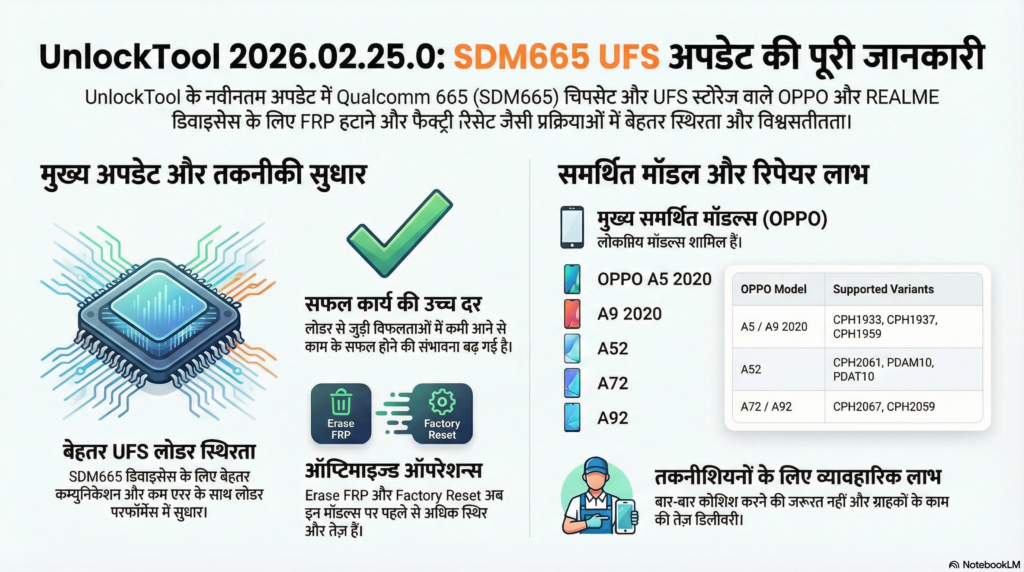
UnlockTool has released a new maintenance update focused on improving stability and performance for Qualcomm 665 (SDM665) devices equipped with UFS storage. This update is especially important for technicians handling OPPO and REALME models based on the SDM665 chipset.
The main highlight of this release is the improved UFS loader, designed to enhance communication between the software and device storage during operations like FRP removal and factory reset.
For professionals working in daily repair environments, this update directly improves reliability and reduces operational errors.
Table of Contents
UnlockTool Major Highlight – Improved UFS Loader for Qualcomm 665 (SDM665)
Many OPPO and REALME devices powered by the SDM665 chipset use UFS storage instead of eMMC. UFS devices require precise loader compatibility for successful communication during service operations.
With version 2026.02.25.0:
- Loader stability has been improved
- Device detection is more consistent
- Storage handshake is more reliable
- Error interruptions during FRP or reset operations are reduced
This results in smoother workflow inside the service tool.
For technicians who regularly handle pattern lock, FRP, or reset jobs, stable loader performance is critical. Any mismatch or unstable loader can cause failed operations or unnecessary time loss. This update addresses those concerns.
Supported Operations
The following operations are fully supported and optimized under the improved loader:
- Erase FRP
- Factory Reset
These operations are now more stable on supported SDM665 UFS-based devices.
Supported Models
OPPO A5 2020
- CPH1959
- CPH1933
- CPH1935
- CPH1943
OPPO A9 2020
- CPH1937
- CPH1939
- CPH1941
OPPO A52
- CPH2061
- CPH2069
- PDAM10
- PDAT10
- PDAM00
OPPO A72
- CPH2067
OPPO A92
- CPH2059
If you frequently receive these models in your shop for FRP removal or reset services, updating to this latest version is strongly recommended.
Practical Benefits for Mobile Repair Professionals
In a real workshop environment, speed and reliability define productivity. This update provides:
1. Better Success Rate
Reduced loader-related failures increase job completion success.
2. Faster Job Handling
Improved communication with UFS storage reduces processing time.
3. Fewer Reattempts
Less need to repeat operations due to communication errors.
4. Stable Daily Usage
Suitable for high-volume service environments.
When dealing with customer devices, especially newer OPPO and REALME models, stability matters more than anything. This update strengthens operational consistency.
Unlock Tool License Activation
Available Plans: 3 Months / 6 Months / 12 Months
Fast Activation • Genuine License • Trusted Service
Need assistance? Contact us directly on WhatsApp for instant support.
Technical Insight – Why UFS Loader Improvement Matters
UFS storage is faster and more complex than traditional eMMC. It requires:
- Accurate loader matching
- Stable protocol handling
- Clean storage communication
An unstable loader can cause:
- Device not detected errors
- Operation stuck at handshake
- Failure during partition access
With this release, UnlockTool has optimized its loader structure for SDM665 UFS architecture, improving compatibility and reducing common service interruptions.
How to Update to Version 2026.02.25.0
- Open UnlockTool software
- Login with your active license
- Software will automatically check for updates
- Install the latest version
- Restart the tool before performing operations
Always ensure you are running the latest version to avoid compatibility issues.
Recommended for
- Professional mobile repair technicians
- FRP service providers
- Unlocking specialists
- High-volume service centers
- Field technicians handling OPPO/REALME Qualcomm devices
⚠ IMPORTANT DRIVER WARNING
Follow the steps carefully to fix driver conflict issue. Incorrect registry editing may affect system stability.
Step 2: Go to:
C:\Windows\System32\drivers
Find related driver file and delete it (or move it to Desktop for backup).
Step 3: Open Registry Editor.
Navigate to:
HKEY_LOCAL_MACHINE\SYSTEM\CurrentControlSet\Control\Class\{36fc9e60-c465-11cf-8056-444553540000}
Delete the entry:
UpperFilters
Download Tool And Drivers
📦 DRIVERS & RAMDISK APPLE DOWNLOAD
All required drivers and ramdisk files for Apple service operations.
What are these drivers used for?
These drivers are required for proper device detection when using Unlock Tool and other servicing software. Without installing correct drivers, the device may not connect in normal, EDL, or diagnostic mode.
Do I need to install drivers before using Unlock Tool?
Yes. It is strongly recommended to install all required drivers before performing any operation. Proper driver installation ensures stable communication between PC and device.
What is iPhone Ramdisk used for?
iPhone Ramdisk files are used for special service operations such as bypass, data access, or maintenance procedures depending on the supported function inside the tool.
What is iPad Ramdisk?
iPad Ramdisk works similar to iPhone Ramdisk but is specifically prepared for iPad models. It allows certain service-level operations when used with compatible tools.
What is DIAG file?
DIAG (Diagnostic) files are used to boot devices into diagnostic mode. This mode is required for advanced servicing, testing, or specific repair operations.

